Tablet Battery Replacement
Read more
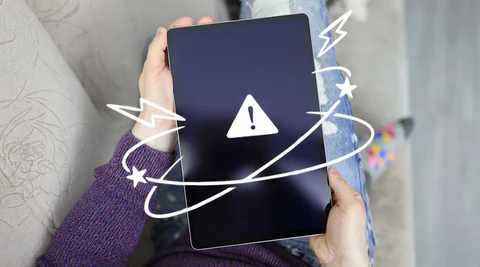
Tablet users often assume their device is completely dead when the screen suddenly goes black. However, in many cases, the issue is not a total failure—it’s a backlight problem, one of the more advanced yet repairable faults in modern tablets.
The backlight is the component responsible for illuminating your tablet’s display. Without it, your screen may appear completely black even though the device is still powered on and functioning internally.
A common sign of this issue is when:
This happens because the display panel itself may still be working, but the lighting system behind it has failed.
Backlight failure is typically linked to internal hardware issues rather than simple surface damage. Some of the most common causes include:
The backlight IC controls the power supply to the screen’s lighting system. When it fails, the display receives no illumination, resulting in a black screen despite the tablet being on.
Backlight LEDs or their driver circuits can burn out or fail due to:
A poorly connected or damaged flex cable can interrupt power flow to the backlight, especially after drops or improper repairs.
Moisture or impact can corrode or damage the delicate circuitry responsible for screen illumination.
If your tablet shows signs of backlight failure, the most effective solution is to have it professionally diagnosed and repaired.
You can find a trusted repair location by visiting: www.cellphonerepair/locations
A certified technician can quickly determine whether your issue requires:
Other Issues


Get It Fixed Today!
CPR Cell Phone Repair can provide holistic warranty and repair solutions for all of your business’ devices.

Buy or Sell Your Device
CPR Cell Phone Repair can provide holistic warranty and repair solutions for all of your business’ devices.




All CPR Stores are independently owned and operated and may not offer all of the repair and warranty types listed on this website. Contact your local store for their specific repair capabilities and warranty terms. MMI-CPR, LLC and CPR Stores are not liable for warranties made by third parties on specific accessories or devices sold at CPR Stores. All product and company names are trademarks of their respective holders. iPhone, iPad, iPod, iPod touch, Mac and iMac are registered trademarks and property of Apple, Inc. CPR is a third-party repair company and is not affiliated with Apple.

Other
Tablet users often assume their device is completely dead when the screen suddenly goes black. However, in many cases, the issue is not a total failure—it’s a backlight problem, one of the more advanced yet repairable faults in modern tablets.
The backlight is the component responsible for illuminating your tablet’s display. Without it, your screen may appear completely black even though the device is still powered on and functioning internally.
A common sign of this issue is when:
This happens because the display panel itself may still be working, but the lighting system behind it has failed.
Backlight failure is typically linked to internal hardware issues rather than simple surface damage. Some of the most common causes include:
The backlight IC controls the power supply to the screen’s lighting system. When it fails, the display receives no illumination, resulting in a black screen despite the tablet being on.
Backlight LEDs or their driver circuits can burn out or fail due to:
A poorly connected or damaged flex cable can interrupt power flow to the backlight, especially after drops or improper repairs.
Moisture or impact can corrode or damage the delicate circuitry responsible for screen illumination.
If your tablet shows signs of backlight failure, the most effective solution is to have it professionally diagnosed and repaired.
You can find a trusted repair location by visiting: www.cellphonerepair/locations
A certified technician can quickly determine whether your issue requires:
Choose what you need fixed to begin your Free repair estimate — we’ll guide you every step of the way.
Smartphone
Computer

Tablet

Console
All CPR Stores are independently owned and operated and may not offer all of the repair and warranty types listed on this website. Contact your local store for their specific repair capabilities and warranty terms. MMI-CPR, LLC and CPR Stores are not liable for warranties made by third parties on specific accessories or devices sold at CPR Stores. All product and company names are trademarks of their respective holders. iPhone, iPad, iPod, iPod touch, Mac and iMac are registered trademarks and property of Apple, Inc. CPR is a third-party repair company and is not affiliated with Apple.